Enterprise AI Systems, Explained · Part 2
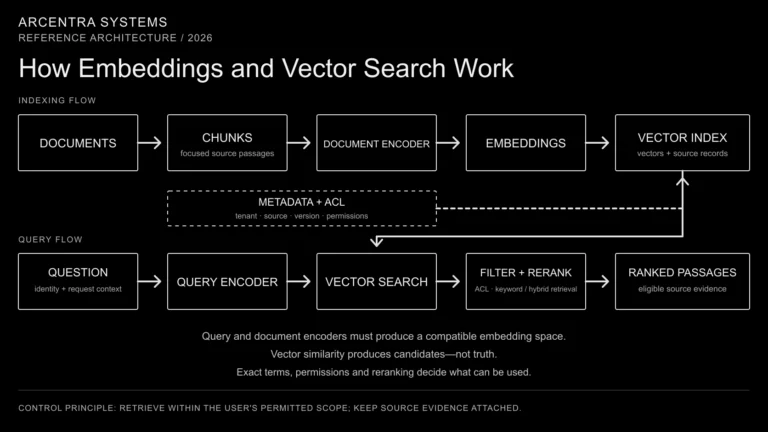
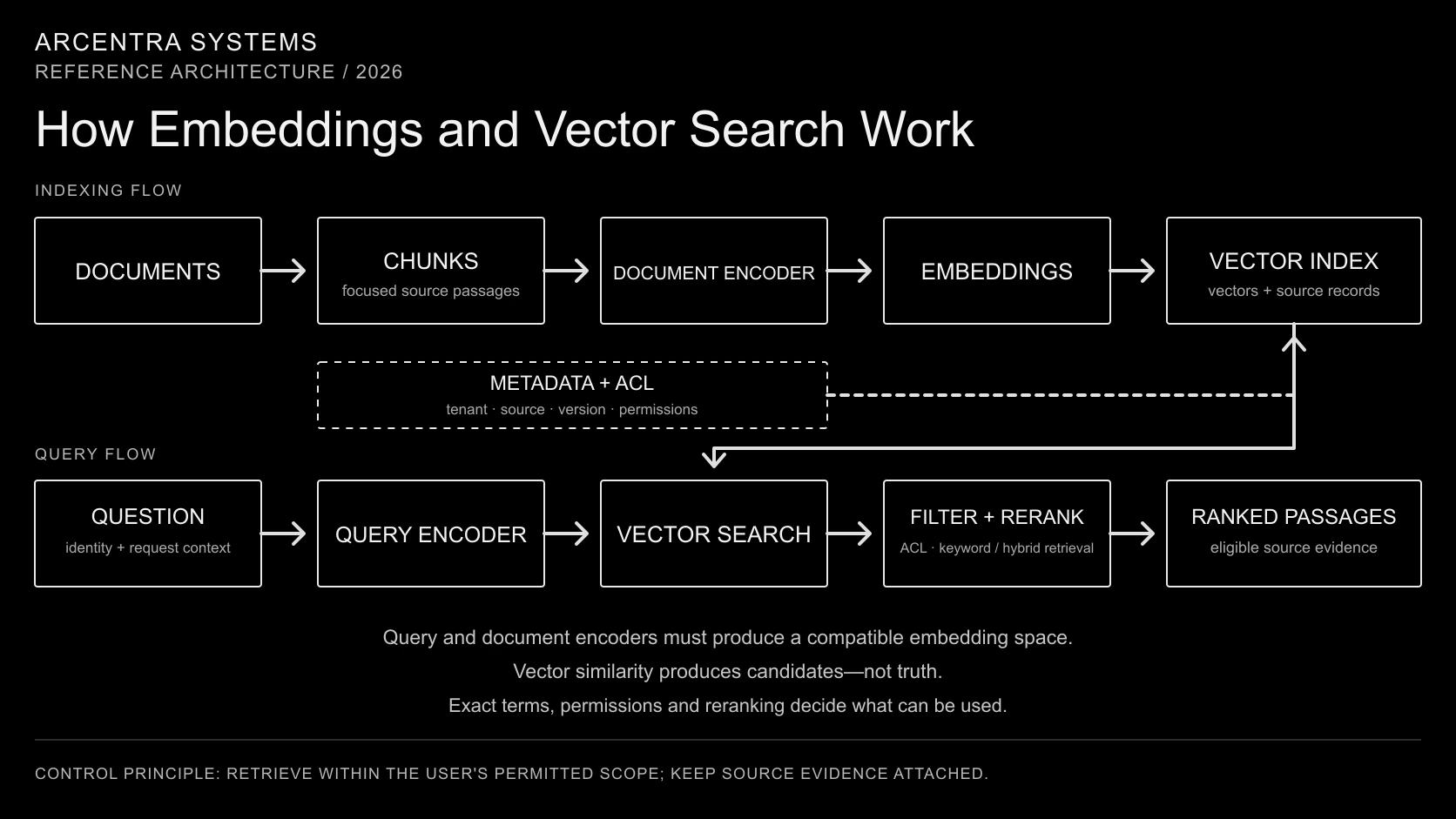
Open the vector-search diagram at full size.
Suppose an employee asks an internal assistant:
Can we leave this supplier agreement before the renewal date?
The contract may never use the words “leave early.” It may describe “termination for convenience,” “notice periods” or “non-renewal.” A normal keyword search can miss the connection.
Embeddings give the search system another way to look for it. They turn the question and the contract passages into numerical representations, then compare those representations to find text with a similar meaning.
This article follows the complete path: how text becomes a vector, how vectors are searched, where metadata and permissions enter the flow, and why production systems combine vector search with other retrieval methods.
What is an embedding?
An embedding is a list of numbers produced by a model. The list represents useful patterns in a piece of data such as text, an image or audio.
A text embedding might look like this:
[0.18, -0.42, 0.71, 0.03, ...]The individual numbers are not labels that an engineer can read. The first number does not mean “contract” and the second does not mean “termination.” What matters is the position of the whole vector relative to other vectors.
When an embedding model places two passages near each other, it is saying that they look similar according to the patterns the model learned. A passage about ending a supplier agreement can therefore be close to a question about leaving a contract early even when the wording is different.
Google describes embeddings as vector representations in an embedding space, where distance expresses relative similarity between items. That is the useful mental model: every passage becomes a point, and similar passages tend to occupy nearby regions.
Embeddings are not summaries or facts
An embedding does not contain a readable copy of the original document. It is also not a verified statement about what the document means.
It is a representation optimized for comparison.
This distinction matters because a high similarity score is not proof that a result is correct. Two passages can be close because they discuss the same general topic while disagreeing on the details. A policy from the wrong country may look similar to the policy the user needs. An obsolete contract can be close to its current version.
Embeddings narrow the search. The surrounding system must still decide which content is eligible, current and useful.
The system has two separate flows
Vector search becomes easier to understand when we separate two processes:
- indexing company content before anyone asks a question;
- searching that index when a request arrives.
In the diagram, an encoder is the model that converts text into an embedding. The document encoder processes stored passages; the query encoder processes the incoming question.
Documents and questions must be encoded into a compatible vector space. This often means using one embedding model, but not necessarily identical input settings: retrieval models can use distinct query and document task modes or a jointly trained pair of encoders. Follow the model’s retrieval instructions and version both encoding configurations together.
Flow one: preparing documents for search
1. Read approved sources
The indexing pipeline connects to document stores, wikis, databases, ticketing systems or other approved sources. It reads the content that the search service is allowed to index.
This is already an operational process. Connectors need credentials, incremental updates, retries and a way to detect deleted or replaced records and changed permissions.
2. Split documents into chunks
Embedding an entire handbook or contract as one item usually produces a representation that is too broad. Returning the whole document also gives the language model far more text than it needs.
The pipeline therefore splits large documents into smaller sections called chunks. A useful chunk should contain enough context to make sense on its own but remain focused enough to match a specific question.
Chunk boundaries can follow headings, paragraphs, pages or domain-specific structure. There is no universal perfect size. A legal clause, a support procedure and a source-code function have different natural boundaries.
A chunk must also fit within the embedding model’s input limit, usually measured in tokens—small pieces of text processed by the model. Check how the service handles longer inputs: it may reject them or truncate them, leaving part of the passage out of the embedding.
3. Attach metadata
Each chunk should retain information about where it came from and how it may be used. Typical metadata includes:
- source document and URL;
- section or page;
- version and modification date;
- owner and business domain;
- tenant, region or jurisdiction;
- access-control attributes;
- content type and language.
A tenant is an organization or account whose data must remain isolated in a shared service. The vector helps find similar meaning; metadata lets the platform apply exact rules.
4. Generate an embedding
The pipeline sends each chunk to an embedding model. The model returns a vector with a fixed number of dimensions.
Dimension count depends on the model and its configured output size, not on document length. A short question and a long passage can both produce vectors with the same number of values.
Changing the embedding model is not a transparent configuration change. A new model can produce a different vector space, so existing content may need to be re-embedded and reindexed.
5. Store the vector and the source record
The system stores the vector together with the chunk text, its identifier and metadata. This can live in a dedicated vector service, a search engine, or a database with vector-search support.
The important architectural question is not the product name. It is whether the index supports the required scale, update rate, filters, tenancy boundaries, backup model and measured retrieval quality.
Flow two: searching when a question arrives
1. Receive the question and identity
The application sends the user’s question together with the identity and request context. Search should not begin with anonymous text if the result set depends on who is asking.
2. Apply query preparation
The platform may normalize spelling, identify a product code, detect the language or rewrite a conversational question into a clearer search query.
This step should remain observable. If a rewritten query changes the meaning, operators need to see it later.
3. Generate the query vector
The prepared question passes through the query encoder or query task mode compatible with the document embeddings. The result is a query vector. Matching vector dimensions alone does not make unrelated embedding models compatible.
4. Find nearby vectors
The search engine scores the query vector against indexed vectors and returns a limited set of the strongest candidates. This is often called top-k retrieval, where k is the number of results requested.
Common comparison methods include cosine similarity, dot product and Euclidean distance. Cosine compares vector direction; dot product also depends on vector length; Euclidean distance measures the distance between points. Use the metric and normalization recommended for the embedding model. These choices can change the ranking, as explained in Qdrant’s documentation on vector metrics.
The resulting scores rank candidates; they do not certify that the passages answer the question.
5. Filter, combine and rerank
Tenant and access constraints should scope retrieval. Some engines also security-trim candidates after search; that must happen before passage text reaches an unauthorized consumer, including an external reranker. The first vector results are only candidates. A production retrieval pipeline can:
- remove content outside the user’s permissions;
- filter by tenant, source, date or jurisdiction;
- combine vector results with keyword results;
- remove duplicates;
- rerank the strongest candidates with a more precise model;
- return the selected passages with source references.
A common reranker reads the question and each candidate passage together, then scores how well the passage answers the question. Because this is more expensive than comparing stored vectors, it is usually applied to a small candidate set.
These selected passages can be shown directly in search results or passed into a RAG workflow for answer generation.
Why not compare every vector?
For a small index, the engine can compare the query with every stored vector and return the exact nearest neighbours. This becomes expensive as the collection grows.
Large systems commonly use approximate nearest-neighbour indexes. Algorithms such as HNSW avoid checking every point by building a structure that helps the engine reach promising areas quickly.
Approximate search can miss vectors that an exhaustive search would place among the nearest results. Index settings therefore trade latency and memory use against ANN recall: how closely approximate results match the exact nearest neighbours.
ANN recall and relevance are different measurements. An index can find the nearest vectors accurately while the embedding model still ranks the wrong passages highly. Test both the index against exact search and the retrieved passages against representative company questions.
Why keyword search still matters
Vector search is good at paraphrases and conceptual similarity. Keyword search is often better at exact identifiers and rare terms.
Consider these queries:
INV-2026-00481;CVE-2025-55182;- a customer’s legal name;
- a specific clause number;
- an error message copied from a log.
An embedding may place related items nearby, but the user expects the exact record. Traditional text indexes handle this kind of match well.
Hybrid search runs vector and keyword retrieval together and merges their result lists. Microsoft’s Azure AI Search documentation describes this pattern as combining conceptual similarity from vector search with the precision of full-text search.
For enterprise knowledge, hybrid retrieval is often a safer default than treating vector search as a replacement for every existing search technique.
Authorization must be part of retrieval
A semantically relevant document is not automatically an authorized document.
If the user cannot access a salary file, legal case or another tenant’s record in the source system, vector search must not surface it. This rule should be applied before restricted content reaches the model.
Permission filtering also affects retrieval quality. With approximate indexes, filtering only after the nearest candidates are selected can leave too few usable results. The platform may need pre-filtering, partitioned indexes, larger candidate sets or iterative scans.
We cover this boundary in more detail in Enterprise RAG Is an Authorization Problem Before It Is a Search Problem.
What commonly goes wrong
The chunks are poorly formed
If a chunk cuts a table in half, loses its heading or mixes several unrelated topics, its embedding and returned text will both be weak.
The query and documents use incompatible models
Vectors produced by unrelated embedding models do not share a useful coordinate system. Model versions and embedding configuration must be treated as versioned index dependencies.
The index is stale
Good similarity over obsolete content still produces the wrong operational result. Index freshness, deletion handling and reprocessing failures need monitoring.
Metadata is missing
Without source, version, tenant and authorization attributes, the platform cannot reliably filter candidates or explain where a passage came from.
Similarity is mistaken for confidence
A similarity score is meaningful inside a particular model, index and query pattern. It is not a universal probability that the answer is correct.
A nearest-neighbour search can still return candidates when none answers the question. The application needs a way to reject weak evidence and return “no suitable result.” Any score threshold should be tested for the chosen model and workload; it is not a universal confidence cutoff.
The team measures latency but not relevance
Search quality needs a test set of representative questions and expected useful passages. Teams should measure whether the required evidence appears in the candidate set, not only how quickly the API responds.
A practical production checklist
Before treating vector search as a shared service, verify that the platform can answer these questions:
- Which sources are indexed, and how quickly do changes appear?
- How are documents divided into chunks?
- Which embedding model and version produced the vectors?
- How will the index be rebuilt after a model change?
- Which metadata fields control eligibility and authorization?
- Do exact identifiers also use keyword search?
- How are vector and keyword results combined?
- What test set measures recall and relevance?
- Can operators trace a result back to its source passage?
- What happens when ingestion, embedding or indexing fails?
Where this fits in the enterprise AI system
Embeddings and vector search are one retrieval mechanism inside a larger platform.
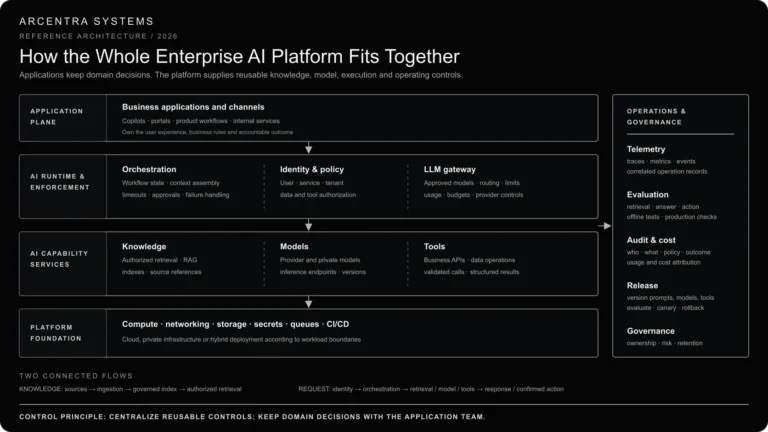
The application receives the request. Identity determines the user’s scope. Retrieval finds eligible evidence. RAG prepares that evidence for a language model. The LLM gateway controls model access. Evaluation and observability show whether the operation worked.
The opening article in this series, How Enterprise AI Systems Work, introduces the complete platform.
The essential path for this part is shorter:
Documents → chunks and metadata → document embeddings → vector index; question and identity → compatible query embedding → search within the user’s permitted scope → ranked source passages.
Embeddings make meaning searchable. They do not replace source data, exact search, authorization or evaluation. Those surrounding controls are what turn a useful mathematical representation into dependable enterprise retrieval.
Continue with How RAG Works, Part 3 of the series.